Google Calendar Link
What it is
Section titled “What it is”With a calendar link, Google Calendar (the same one you use with Gmail) shows your Blakk appointments alongside your other events, on your computer and phone. You don’t need the Google integration—just subscribe to the link.
When to use it
Section titled “When to use it”- You use Google Calendar every day and want to see your Blakk appointments there.
- Your studio doesn’t have the Google Calendar integration enabled, or you prefer not to connect your Google account.
Before you start
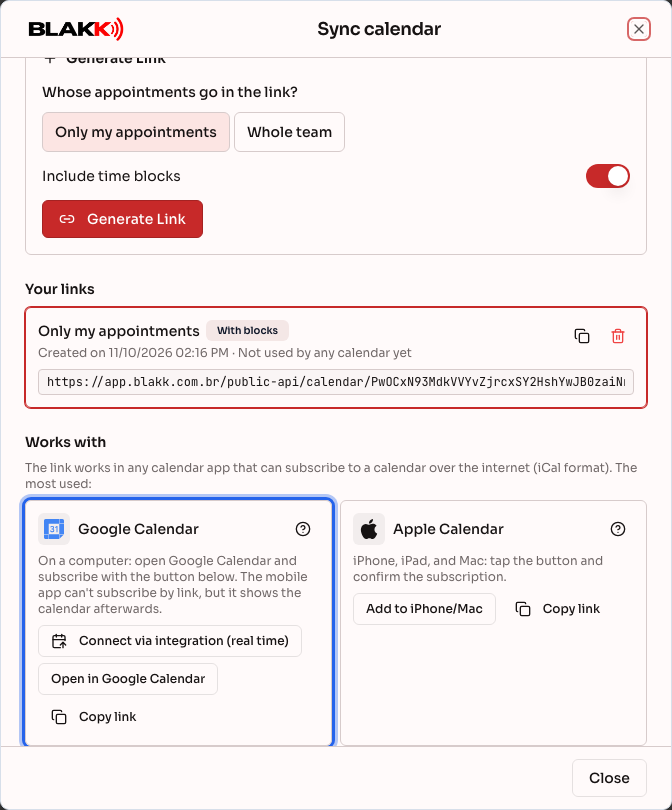
Section titled “Before you start”Generate the link in Sync calendar in Calendar (see Calendar link). Use a computer: the Google Calendar app on your phone doesn’t let you subscribe to a calendar link, but it will show the calendar after you subscribe on your computer.
If your studio has the Google Calendar integration, the Google card also shows Connect via integration (real time). Choose one option: using both with the same account will show each appointment twice.
Step by step
Section titled “Step by step”Step 1 — Open the Google Calendar card
Section titled “Step 1 — Open the Google Calendar card”In Sync calendar, with the link already generated, go to the Google Calendar card and click Open in Google Calendar.
Step 2 — Confirm in Google Calendar
Section titled “Step 2 — Confirm in Google Calendar”Google Calendar opens in a new tab and asks if you want to add the calendar. Make sure you’re signed in to the right Google account, then click Add. Button names may vary depending on your version of Google Calendar.
Step 3 — If you prefer to paste the link manually
Section titled “Step 3 — If you prefer to paste the link manually”In Google Calendar on your computer, next to Other calendars, click + → From URL. Paste the link copied with Copy link, then click Add calendar.
Step 4 — View it on your phone
Section titled “Step 4 — View it on your phone”Open the Google Calendar app with the same account. The new calendar appears in your calendar list. If it’s hidden, open Settings, tap its name, and turn on Sync.
What happens next
Section titled “What happens next”- Appointments appear in a separate calendar, which you can color-code or hide in Google Calendar.
- Google checks for changes automatically at intervals it determines (this can take up to 24 hours).
- An appointment canceled in Blakk disappears from Google the next time it updates.
Common mistakes and questions
Section titled “Common mistakes and questions”Q: I clicked Open in Google Calendar, but nothing happened. A: Your browser may have blocked the new tab. Allow pop-ups for the site or use Step 3 to paste the link manually.
Q: A new appointment still hasn’t appeared in Google Calendar. A: This is due to Google’s update schedule, which can take up to 24 hours and can’t be sped up. For real-time updates, use the Google Calendar integration, if your studio has it.
Q: Each appointment appears twice in Google Calendar. A: The same Google account is using both the integration and the link. Remove the calendar you subscribed to using the link in Google Calendar or disconnect the integration—use only one.
Q: Google says it couldn’t add the calendar. A: Make sure the entire link was copied and that it hasn’t been revoked in Your links. Generate a new one if needed.
Q: Can I book an appointment in Google Calendar? A: No. The subscribed calendar is read-only. Appointments must be made in Blakk.