Cost Centers: Organize Expenses by Business Area
What it is
Section titled “What it is”A cost center is a way to separate expenses and sales by area of your studio—for example, by location, service line, or administrative and operational functions. Unlike the Chart of Accounts (which classifies WHAT an expense is—for example, rent, payroll, or supplies), a cost center classifies WHERE or WHICH area it belongs to. Unlike the Chart of Accounts, your studio doesn’t come with any cost centers set up—the list starts empty until you create the first one.
When to use it
Section titled “When to use it”- You want to see how much each location or area of your studio spends, separately from the total.
- An expense or accounting entry requires a cost center, and you haven’t created one yet.
- You want your studio’s sales to be automatically assigned to a cost center, or you want to change which cost center is used.
Before you start
Section titled “Before you start”If you don’t see Cost Centers in the menu or can’t create or edit one, ask the studio owner to grant you access under Access → Roles. Deleting a cost center requires a higher access level (Full) than creating or editing one (Edit): with Edit access, the delete icon won’t appear.
Cost centers are optional: an expense or sale without a selected cost center will still work as usual. Create a cost center only if you want this extra level of detail in your reports.
Step by step
Section titled “Step by step”Step 1 — View the cost center list
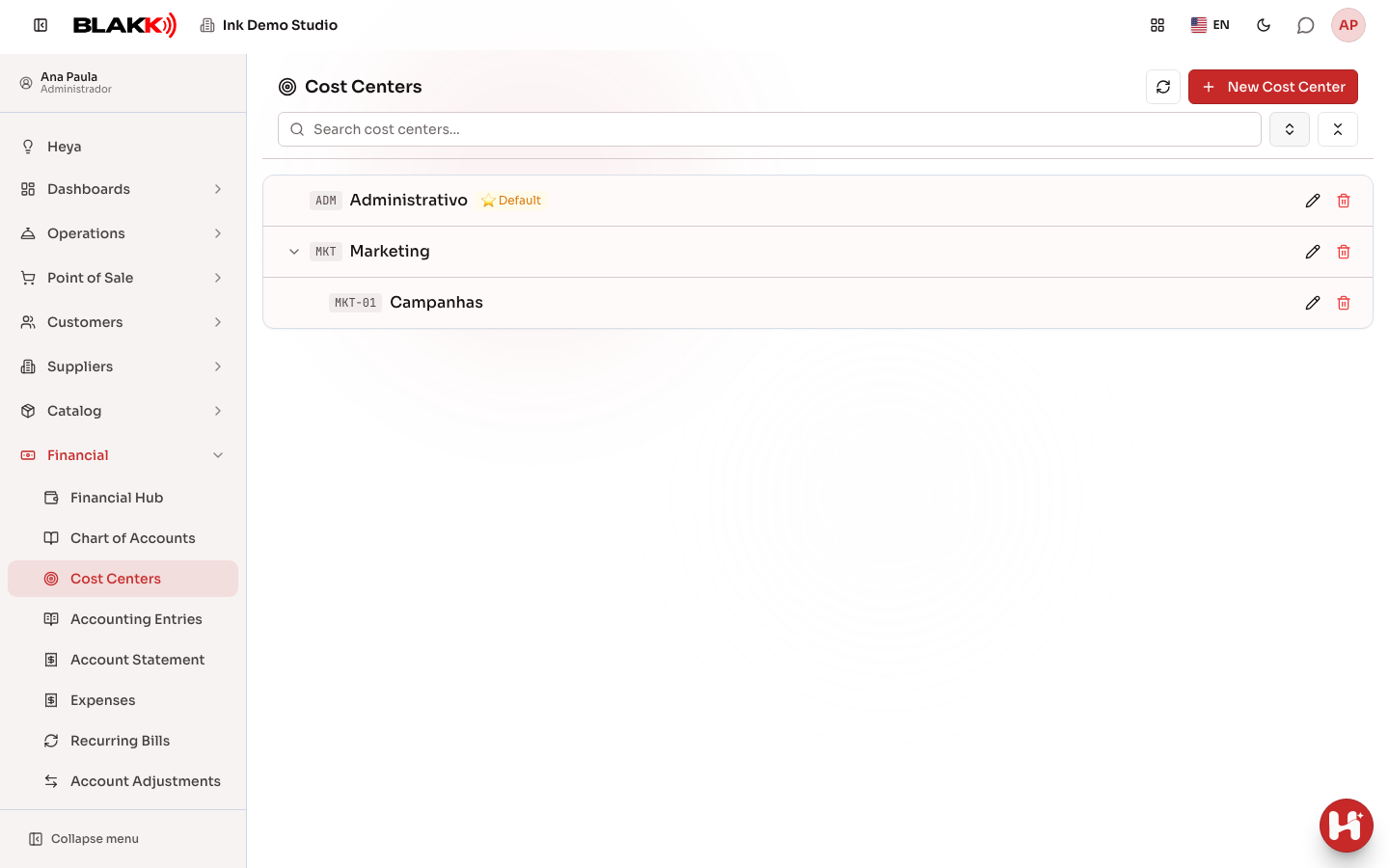
Section titled “Step 1 — View the cost center list”The list shows the hierarchy (click the arrow to expand a cost center’s child centers, or use the Expand All/Collapse all icons) and marks with a star Default the cost center automatically used for accounting entries from sales (checkouts, website sales, and recurring revenue). Inactive cost centers appear with Inactive next to the name. Use Search cost centers… to find one by code or name.
Step 2 — Create a cost center
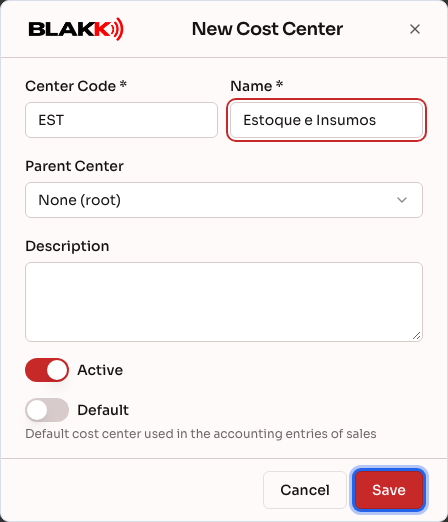
Section titled “Step 2 — Create a cost center”Click New Cost Center, fill in Center Code and Name (both are required; the code must be unique), and, if appropriate, select a Parent Center to make this cost center a child of another one. Below, you’ll find Description and the Active and Default toggles. Click Save.
Step 3 — Why a cost center may not be deletable
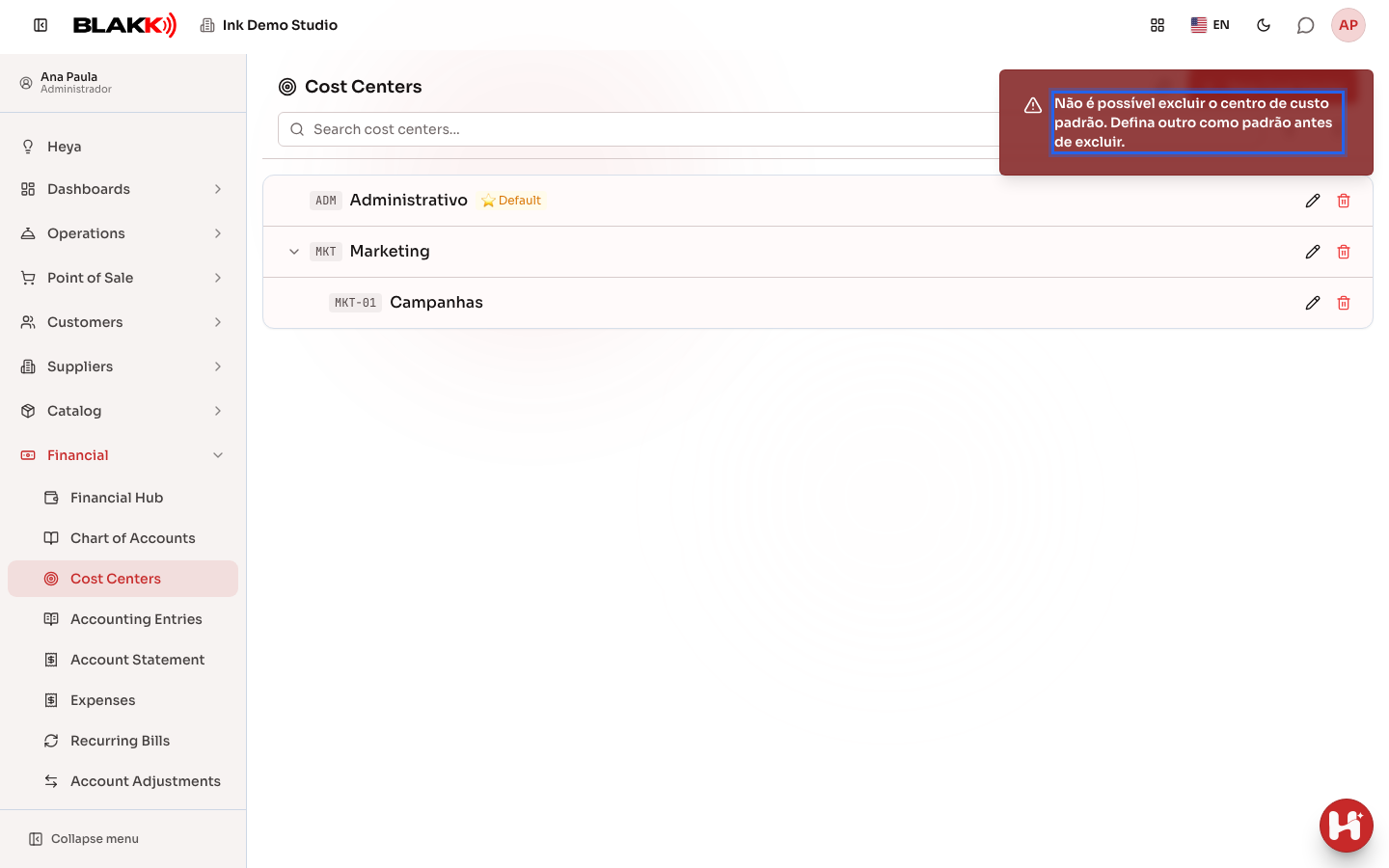
Section titled “Step 3 — Why a cost center may not be deletable”Click the Delete icon for the cost center marked as Default and confirm. The system will reject the request and explain why. The same thing happens if the cost center has child centers or has already been used in a sale, expense, or accounting entry.
What happens next
Section titled “What happens next”- There can only be one Default cost center at a time—marking another one as the default automatically unmarks the previous one, so you don’t have to do it manually first.
- Turning off Active for a cost center removes it from the options for new entries (without deleting its history). If it was the default, the system also removes that designation, since an inactive cost center can’t be the default.
- A cost center that has already been used (in a sale, expense, or accounting entry) can’t be deleted, but it can be deactivated. It will no longer appear as an option on new screens, but its existing history won’t be deleted.
Common mistakes and questions
Section titled “Common mistakes and questions”Q: What’s the difference between a cost center and an account in the Chart of Accounts? A: An account classifies what kind of expense it is (rent, payroll, supplies); a cost center classifies which area is responsible for it (a location, a department). You select both separately when entering an expense.
Q: What happens if I don’t select a cost center when entering an expense? A: Nothing goes wrong—cost centers are optional for each entry. The only difference is that a report grouped by cost center will show the expense without a specific cost center assigned. The Default cost center isn’t applied to expenses; it applies to sales.
Q: Can I have more than one cost center marked as Default? A: No—the system allows only one at a time. Marking a second one as the default automatically unmarks the first, without a warning (this isn’t a conflict; it’s an expected change).
Q: Why is the “Default” toggle disabled when I turn off “Active”? A: An inactive cost center can’t be the default. It no longer appears as an option for new entries, so it wouldn’t make sense for it to continue being filled in automatically.
Q: Why can’t I delete a cost center even though it isn’t the Default and has no child centers? A: In addition to child centers and the Default designation, the system also prevents deletion if the cost center has already been used in a recorded sale, expense, or accounting entry. In that case, deactivate the cost center (turn off Active) instead of deleting it.