Calendar Link in Yahoo Calendar
What it is
Section titled “What it is”The calendar link adds your Blakk appointments to Yahoo Calendar, where the feature is called “Follow a calendar.” Paste the link once, and the schedule updates automatically.
When to use it
Section titled “When to use it”- Your email and calendar are with Yahoo.
- You want to see appointments alongside your Yahoo events.
Before you start
Section titled “Before you start”Generate the link in Sync calendar in Calendar (see Calendar link). Use Yahoo Calendar in a desktop browser.
Step by step
Section titled “Step by step”Step 1 — Copy the link
Section titled “Step 1 — Copy the link”On the Yahoo Calendar card, click Copy link.
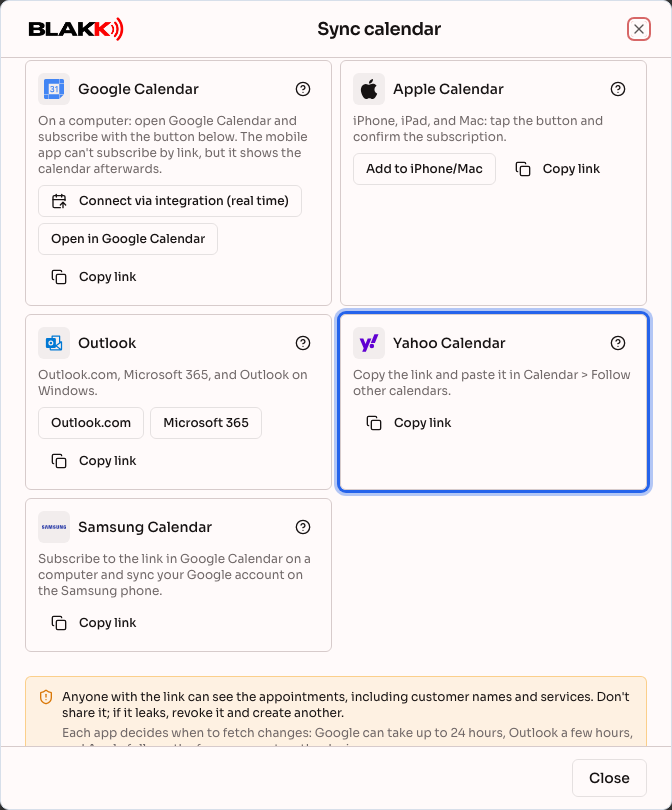
Step 2 — Follow the calendar in Yahoo
Section titled “Step 2 — Follow the calendar in Yahoo”In Yahoo Calendar, open Actions (or the menu next to Calendars) and choose Follow other calendars. Enter a name, paste the link in the iCal URL field, choose how often you want it to update, and click Save. Menu names may vary depending on your version of Yahoo.
What happens next
Section titled “What happens next”- The calendar appears in your Yahoo calendar list, where you can change its color or hide it.
- Yahoo checks for changes at the update frequency you chose.
- An appointment canceled in Blakk disappears from Yahoo the next time it updates.
Common mistakes and questions
Section titled “Common mistakes and questions”Q: I can’t find “Follow other calendars.” A: This option is in Yahoo Calendar in a desktop browser, in the menu next to the calendar list. The mobile app doesn’t have this option.
Q: Yahoo says the link is invalid. A: Make sure you copied the entire link, starting with https, and that it hasn’t been revoked under Your links.
Q: A new appointment still hasn’t appeared in Yahoo. A: Yahoo updates according to the frequency you chose. The change appears right away in Blakk Calendar.
Q: How do I stop seeing the calendar in Yahoo? A: Remove the followed calendar in Yahoo. To revoke access completely, also revoke the link under Your links.
Q: Can I book an appointment in Yahoo? A: No. The followed calendar is read-only; appointments are booked in Blakk.