Calendar Link in Samsung Calendar
What it is
Section titled “What it is”Samsung Calendar displays calendars from accounts added to your phone, such as your Google account. The easiest way to view the Blakk schedule in Samsung Calendar is to subscribe to the link in Google Calendar and let your Google account sync with your Samsung phone.
When to use it
Section titled “When to use it”- You use a Samsung Galaxy phone and its built-in calendar.
- You want phone reminders for your Blakk appointments.
Before you start
Section titled “Before you start”Get the link from Sync calendar in Calendar (see Calendar link). A Google account must be added to your Samsung phone. You’ll need a computer for Step 2.
Step by step
Section titled “Step by step”Step 1 — View the Samsung Calendar card
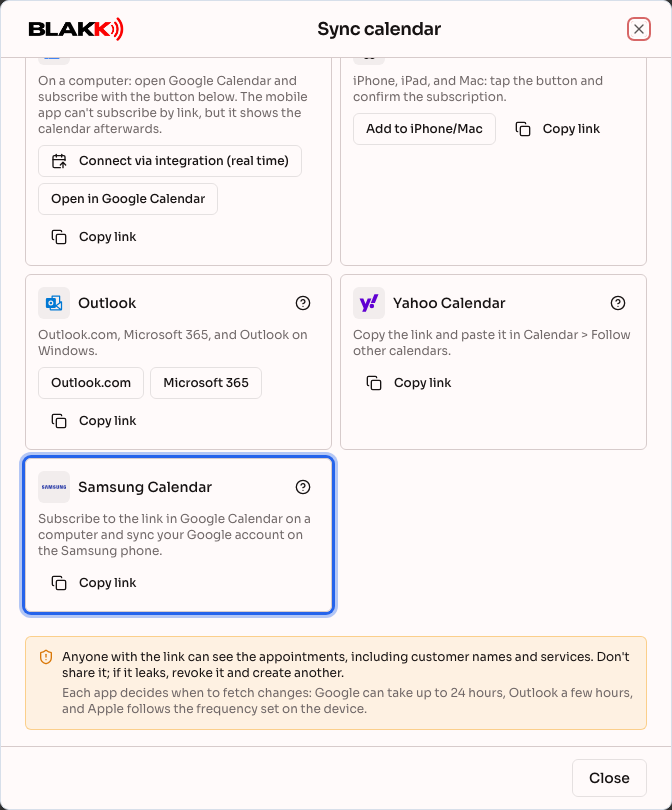
Section titled “Step 1 — View the Samsung Calendar card”On the Samsung Calendar card, select Copy link and open the Google instructions.
Step 2 — Subscribe to the link in Google Calendar
Section titled “Step 2 — Subscribe to the link in Google Calendar”On your computer, subscribe to the link in Google Calendar using the SAME Google account as the one on your phone, as explained in the article Calendar link in Google Calendar.
Step 3 — Turn on the calendar in Samsung Calendar
Section titled “Step 3 — Turn on the calendar in Samsung Calendar”On your phone, open Settings → Accounts and backup → Manage accounts, tap your Google account, then tap Sync account and make sure Calendar is turned on. Then, in Samsung Calendar, open the menu (☰) → Manage calendars and turn on the new calendar. Menu names may vary depending on your model and Android version.
What happens next
Section titled “What happens next”- The Blakk schedule appears in Samsung Calendar as a calendar from your Google account.
- Changes sync to Google first (which may take up to 24 hours), then to your phone when the account syncs.
Common mistakes and questions
Section titled “Common mistakes and questions”Q: I subscribed in Google Calendar, but the calendar isn’t showing up in Samsung Calendar. A: Make sure the Google account on your phone is the same one you used to subscribe to the link, Calendar sync is turned on, and the calendar is selected under Manage calendars. Recently subscribed calendars may take a few minutes to show up on your phone.
Q: Can I paste the link directly into Samsung Calendar? A: It depends on your model and app version. If your app doesn’t have this option, use the Google method in this article. It works on any phone with a Google account.
Q: A new appointment still isn’t showing up on my phone. A: This is due to Google’s update time, plus your phone’s sync time. The change appears right away in Blakk Calendar.
Q: How do I stop seeing the calendar on my phone? A: Remove the subscribed calendar from Google Calendar on your computer. To revoke access completely, also revoke the link under Your links.
Q: Can I book an appointment in Samsung Calendar? A: No. The subscribed calendar is read-only; appointments are made in Blakk.