Outlook Calendar Link (Outlook.com, Microsoft 365, and Windows)
What it is
Section titled “What it is”The calendar link adds your Blakk appointments to Outlook: Outlook.com (Hotmail and Outlook accounts), Microsoft 365 (work accounts), and Outlook for Windows. Once you subscribe, the calendar also appears in the Outlook mobile app.
When to use it
Section titled “When to use it”- You use Outlook or Microsoft 365 for your work calendar.
- You want to see appointments alongside your work meetings.
Before you start
Section titled “Before you start”Generate the link in Sync calendar in Calendar (see Calendar link). Know which account you use: Outlook.com for personal accounts (Hotmail, Outlook, Live) and Microsoft 365 for work or school accounts.
Step by step
Section titled “Step by step”Step 1 — Choose your account on the Outlook card
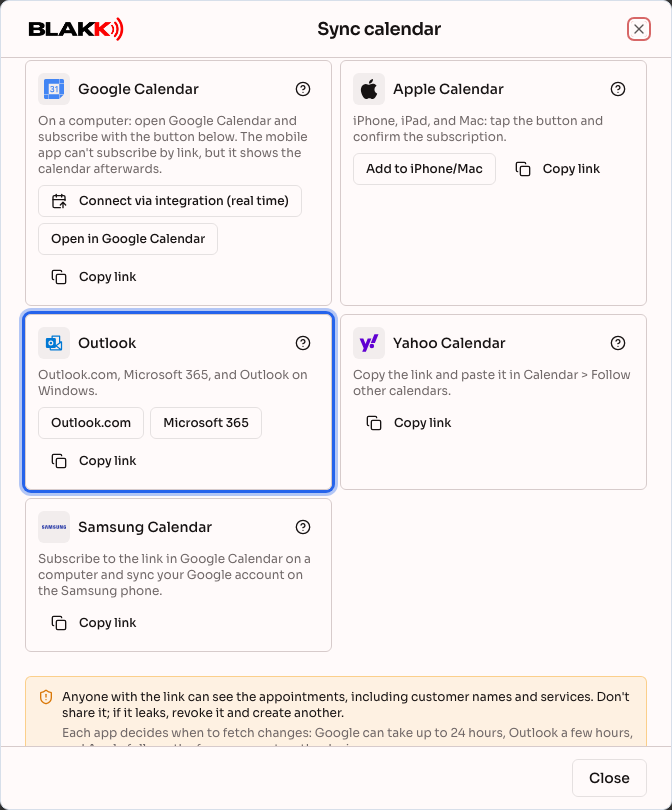
Section titled “Step 1 — Choose your account on the Outlook card”On the Outlook card, click Outlook.com or Microsoft 365, depending on your account.
Step 2 — Import the calendar into Outlook
Section titled “Step 2 — Import the calendar into Outlook”Outlook opens in a new tab with the link already filled in under Subscribe from web. Check the calendar name and click Import. Button names may vary depending on your version of Outlook.
Step 3 — If you prefer to paste the link manually
Section titled “Step 3 — If you prefer to paste the link manually”- Outlook on the web and the new Outlook for Windows: In Calendar, click Add calendar → Subscribe from web, paste the link, name the calendar, and click Import.
- Classic Outlook for Windows: Go to File → Account Settings → Account Settings → Internet Calendars → New, paste the link, and confirm.
What happens next
Section titled “What happens next”- The calendar appears under Other calendars, where you can change its color or hide it.
- Outlook checks for updates automatically, usually within a few hours.
- A calendar subscribed to in Outlook.com or Microsoft 365 also appears in the Outlook mobile app.
Common mistakes and questions
Section titled “Common mistakes and questions”Q: I clicked Outlook.com and landed on the sign-in page. A: Sign in to your account, and Outlook will continue to the import page. If you land on the calendar without the link, follow Step 3.
Q: I chose Outlook.com, but my account is a work account. A: Close the tab and click Microsoft 365. Work and school accounts use Microsoft 365.
Q: A new appointment still isn’t showing up in Outlook. A: Outlook may take a few hours to update. The change appears right away in Blakk Calendar.
Q: Outlook says it couldn’t import the calendar. A: Make sure you copied the entire link and that it hasn’t been revoked in Your links. Some companies block external calendars in Microsoft 365. If that happens, contact your account administrator.
Q: Can I schedule an appointment in Outlook? A: No. The subscribed calendar is read-only; appointments are scheduled in Blakk.